Background#
When building a system that supports file uploads - whether those are images, videos, or text files, it’s important to ensure the process is durable, secure, extensible, and cost-efficient.
At first glance, file uploads may appear straightforward. However, subtle challenges quickly emerge:
- Unstable networks can interrupt uploads.
- High concurrency can strain the system.
- Clients might attempt to access or overwrite unintended files.
- Multiple services may end up re-implementing their own upload logic in inconsistent ways.
Designing a robust solution requires balancing these trade-offs carefully.
Uploading directly to file storage#
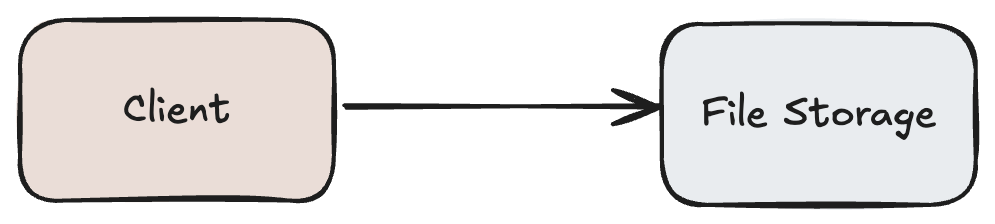
This simplest approach allow clients to upload files directly to the storage layer (e.g., S3, GCS, Azure Blob) via REST APIs.
 1const fs = require("fs");
 2const axios = require("axios");
 3
 4async function uploadFile() {
 5  const filePath = "./secret.txt";
 6  const uploadUrl = "https://files.example.com/upload";
 7
 8  // Client has to embed the API key here (security risk!)
 9  const API_KEY = "my-secret-api-key";
10
11  const formData = new FormData();
12  formData.append("myfile", fs.createReadStream(filePath));
13
14  try {
15    const res = await axios.post(uploadUrl, formData, {
16      headers: {
17        ...formData.getHeaders(),
18        "Authorization": `Bearer ${API_KEY}` // 🔑 exposed in client code
19      }
20    });
21    console.log("Upload success:", res.data);
22  } catch (err) {
23    console.error("Upload failed:", err.message);
24  }
25}
26
27uploadFile();
Pros and cons of this approach:
| Pros | Cons |
|---|---|
| Direct writes are performant.. | Storing credentials on the client is a significant security risk. |
| Object storage systems natively handle large and concurrent writes. | Clients can upload arbitrary files without backend validation. |
| Cheaper in terms of data flow, since files bypass the backend. | Retry and resume logic must be handled entirely by the client. |
This method works in controlled or internal environments but falls short in production scenarios where security and validation are critical.
Upload server taking the lead#
To mitigate security risks and provide more control, an upload server can act as an intermediary between the client and the file storage. The server handles authentication, authorization, and validation before persisting files.

 1func uploadHandler(w http.ResponseWriter, r *http.Request) {
 2    file, handler, err := r.FormFile("myfile")
 3    if err != nil {
 4        http.Error(w, "Error retrieving file", http.StatusBadRequest)
 5        return
 6    }
 7    defer file.Close()
 8
 9    // Save file to disk
10    dst, err := os.Create("/uploads/" + handler.Filename)
11    if err != nil {
12        http.Error(w, "Error saving file", http.StatusInternalServerError)
13        return
14    }
15    defer dst.Close()
16
17    // the server is copying the file from network buffer
18    io.Copy(dst, file)
19
20    fmt.Fprintf(w, "File %s uploaded successfully", handler.Filename)
21}1r := mux.NewRouter()
2r.HandleFunc("/upload", uploadHandler).Methods("POST")
3http.ListenAndServe(":8080", r)curl -F "[email protected]" http://localhost:8080/uploadPros and cons of this approach:
| Pros | Cons |
|---|---|
| Centralized control over authentication and authorization. | Becomes a scalability bottleneck under high load. |
| The upload server can enforce rules such as max size, file type etc | Resource-intensive for large payloads (I/O, memory, multiple network hops). |
| Enables preprocessing (compression, watermarking, encryption) | Users can experience high latencies due to multiple hops in the overall system |
This pattern is common for smaller payloads (e.g., uploading blog content or documents) but becomes inefficient for large media files.
PreSigned URL to the rescue!#
How about we provide the client with a time-bound, permission-limited way of storaging resource directly in the file storage? This is where Pre-Signed URL (AWS S3) or Shared Access Storage (Azure SAS) comes into picture.
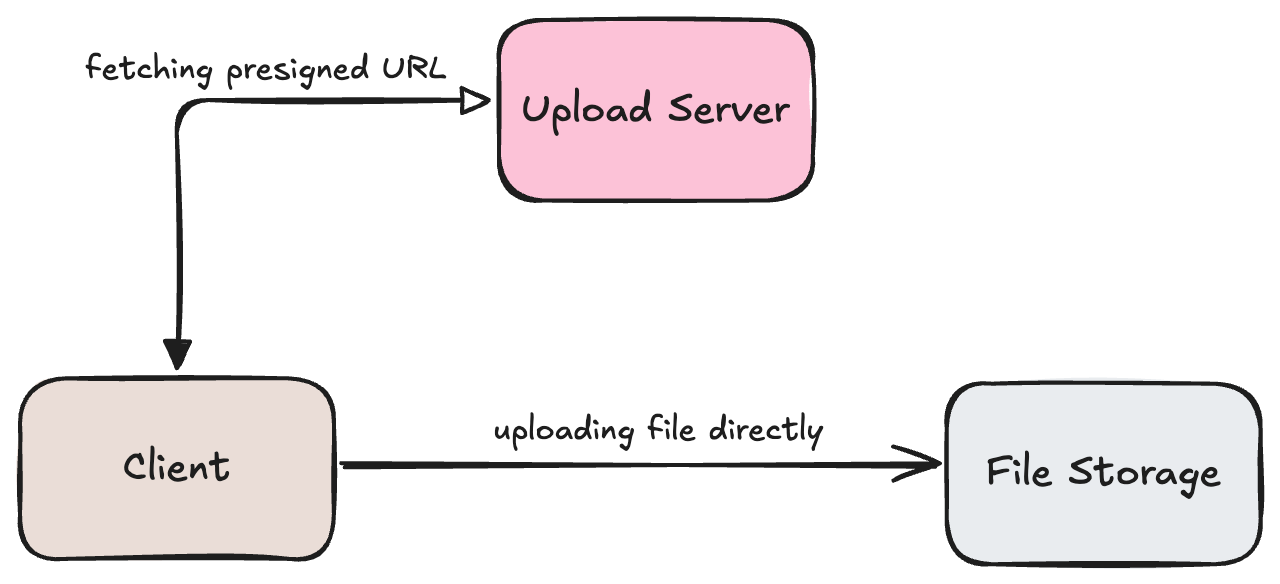
How it works:
- The client requests a pre-signed URL from the upload server.
- The upload server validates the request (file type, user permissions, size limits, etc.) and generates the pre-signed URL.
- The client uploads the file directly to object storage using this URL.
- For large files, the server can generate multiple pre-signed URLs for chunked uploads, which the client can use concurrently.
In case of failure, the client can just retry uploading on the same pre-signed URL which makes it tolerant against unstable network issues.
This approach can be extended further by having the client send an upload acknowledgment to the server. The server then publishes an event - containing file details, type, and flow to the message bus. Downstream consumers can subscribe to this event and perform their respective actions independently.
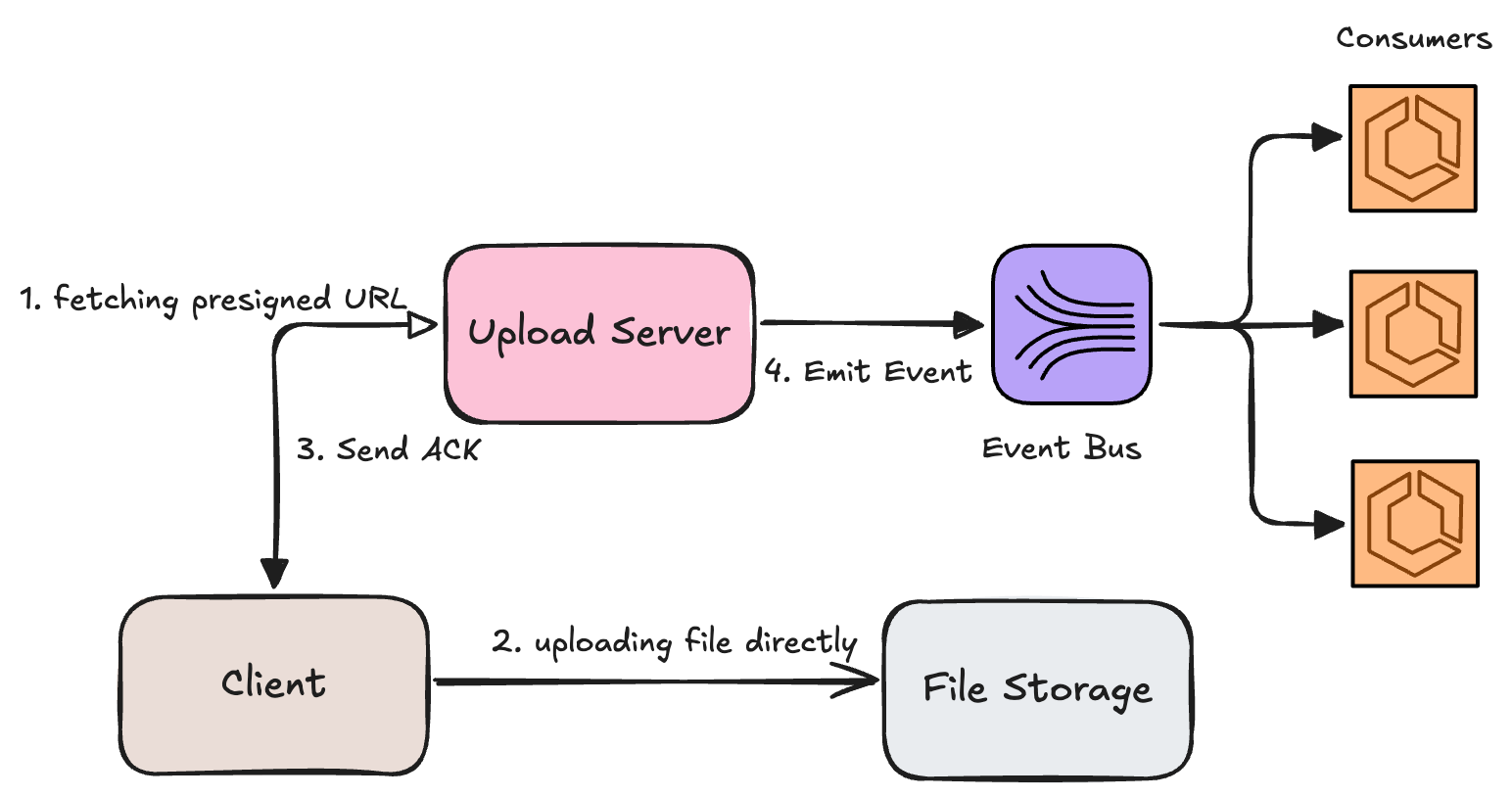
Beyond solving the challenge of large file handling, this design also provides a single, standardized upload service that all internal systems can reuse instead of building their own bespoke solutions.
 1func generatePreSignURL(w http.ResponseWriter, r *http.Request) {
 2  key := r.URL.Query().Get("filename")
 3  if key == "" {
 4    http.Error(w, "missing filename", http.StatusBadRequest)
 5    return
 6  }
 7
 8  // handling validations based on filetype, flow, max file size etc.
 9
10  psClient := s3.NewPresignClient(s3Client)
11  presignedReq, err := psClient.PresignPutObject(context.TODO(), &s3.PutObjectInput{
12    Bucket: aws.String(bucketName),
13    Key:    aws.String(key),
14  }, func(po *s3.PresignOptions) {
15    po.Expires = 15 * time.Minute // valid for 15 minutes
16  })
17
18  if err != nil {
19    http.Error(w, "could not generate presigned URL", http.StatusInternalServerError)
20    return
21  }
22
23  fmt.Fprintf(w, presignedReq.URL)
24} 1const fs = require("fs");
2const axios = require("axios");
3
4async function uploadFile() {
5 const filename = "example.txt";
6 const fileContent = fs.readFileSync(filename);
7
8 // Step 1: Ask server for presigned URL
9 const presignedRes = await axios.get(`http://localhost:8080/get-presigned-url?filename=${filename}`);
10 const uploadUrl = presignedRes.data;
11
12 // Step 2: Upload file directly to S3
13 await axios.put(uploadUrl, fileContent, {
14 headers: { "Content-Type": "application/octet-stream" },
15 });
16
17 // Step 3: Send acknowledgment back to upload server
18 await axios.post("http://localhost:8080/ack", {
19 filename: filename,
20 size: fileContent.length,
21 uploadedAt: new Date().toISOString(),
22 });
23}
24
25uploadFile().catch(console.error); 1type Ack struct {
2 Filename string `json:"filename"`
3 Size int `json:"size"`
4 UploadedAt string `json:"uploadedAt"`
5}
6
7var producer sarama.SyncProducer
8
9func ackHandler(w http.ResponseWriter, r *http.Request) {
10 var ack Ack
11 if err := json.NewDecoder(r.Body).Decode(&ack); err != nil {
12 http.Error(w, "invalid ack payload", http.StatusBadRequest)
13 return
14 }
15
16 eventData, err := json.Marshal(ack)
17 if err != nil {
18 http.Error(w, "failed to serialize event", http.StatusInternalServerError)
19 return
20 }
21
22 // Publish event to Kafka topic
23 msg := &sarama.ProducerMessage{
24 Topic: "<sample_topic>",
25 Value: sarama.ByteEncoder(eventData),
26 }
27
28 partition, offset, err := producer.SendMessage(msg)
29 if err != nil {
30 http.Error(w, "failed to publish event", http.StatusInternalServerError)
31 return
32 }
33
34 fmt.Fprintf(w, "Ack received and event published for %s", ack.Filename)
35}Summary#
- Direct uploads are cheap and fast, but insecure and hard to control.
- Upload servers give you control and validation, but introduce scalability bottlenecks and higher costs.
- Pre-signed URLs with event-driven acknowledgment strike the right balance, clients upload directly to storage for scalability, while the server remains the gatekeeper for security, validation, and orchestration.
In the end, the best solution depends on your use case. For small apps, a simple upload server may suffice. For production-scale systems, direct-to-storage with pre-signed URLs and event-driven processing is often the sweet spot.