Background#
Docker networking often feels like black magic to developers getting started with containers. You spin up a few containers, everything seems to work locally, then suddenly containers can’t talk to each other, or your application can’t reach the database, or port conflicts emerge out of nowhere.
At first glance, Docker networking appears straightforward - just run docker run -p 8080:80 nginx and you’re done, right? However, subtle challenges quickly emerge:
- Container isolation gone wrong: Two containers that should communicate can’t see each other
- Port mapping confusion: Publishing ports vs container-to-container communication
- Network conflicts: Multiple services trying to bind to the same host port
- DNS resolution mysteries: Sometimes containers can ping by name, sometimes they can’t
- Debugging nightmares: Network issues feel impossible to troubleshoot
The root of most confusion lies in not understanding Docker’s default bridge network behavior and when to use user-defined networks instead.
The “Just Works” Illusion#
When you start with Docker, simple examples make networking seem trivial:
docker run -d -p 8080:80 nginx

curl localhost:8080  # This works!
But the moment you need multiple containers to communicate, things get murky fast.
Why can your React app reach the host machine but not the API container?
Why does localhost:3000 work from your browser but not from inside another container?
Understanding bridge networks is the key to demystifying these behaviors
Default Bridge Network#
When Docker starts, it creates a default bridge network called bridge. Unless specified otherwise, all containers join this network.
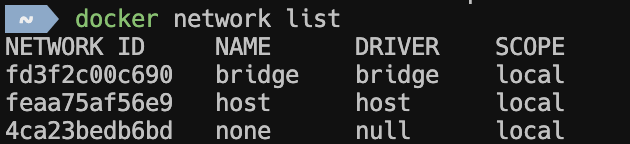
Let’s see this in action by running two containers, and checking their nextwork settings.

This suggests all new containers are part of the same bridge network.
Now let’s try container-to-container communication
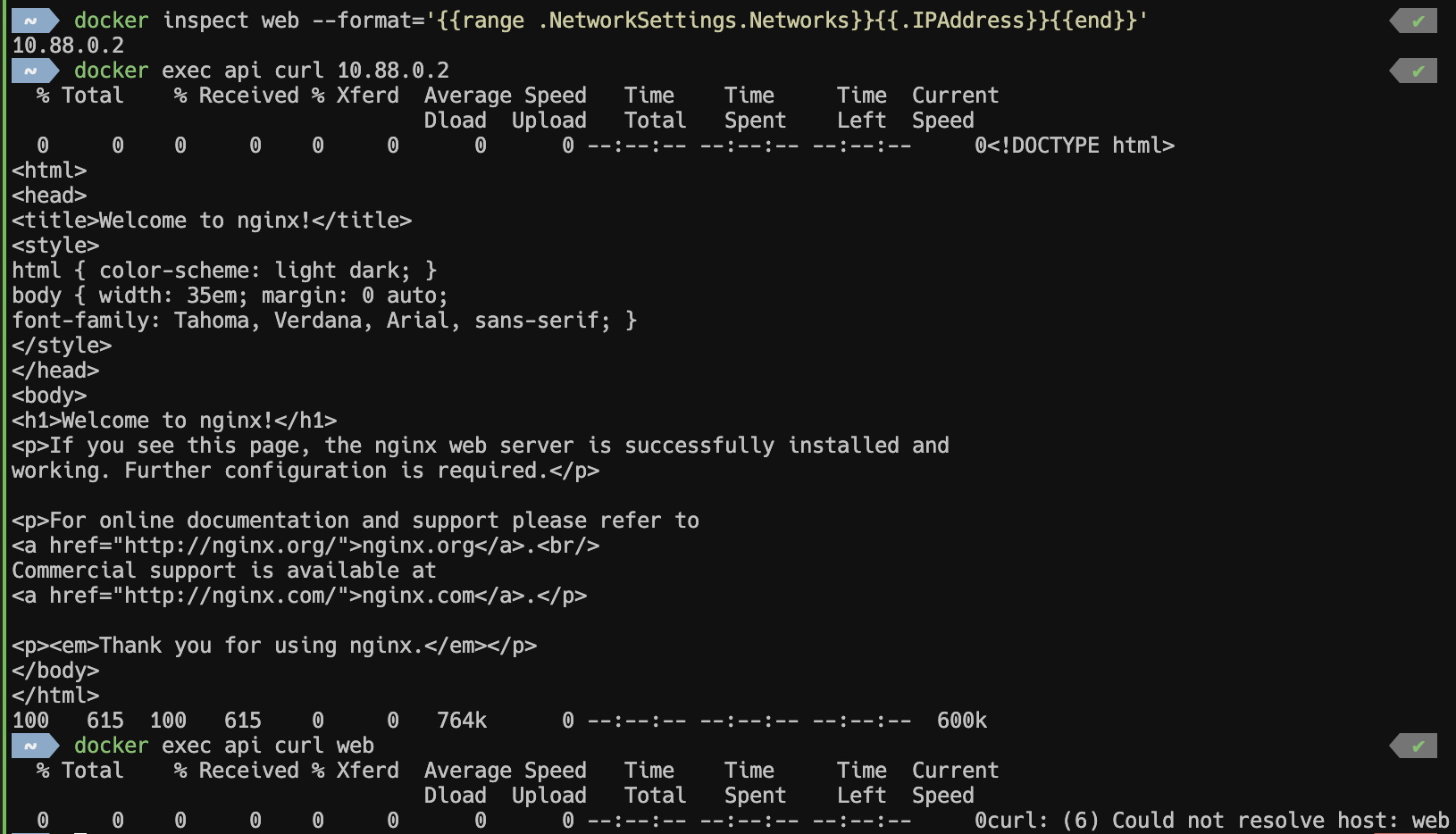
Default bridge limitations#
On the default bridge network, containers can communicate via IP addresses but NOT via container names. DNS resolution between containers doesn’t work on the default bridge.
This creates a brittle setup where you need to:
- Hardcode IP addresses (which change between restarts)
- Use complex service discovery mechanisms
- Rely on external tools for DNS resolution
Port Mapping vs Container Communication#
Another source of confusion is the difference between publishing ports and container-to-container communication:
docker run -d -p 8080:80 --name web nginx

curl localhost:8080 # from host machine, this works

# From another container on the same network, this also works
docker exec api curl web:80  # (if on user-defined network)

# But this is unnecessary for container-to-container communication
docker exec api curl localhost:8080  # localhost refers to the api container itself
The -p flag is for host-to-container communication, not container-to-container. This distinction trips up many developers.
User-Defined Bridge Networks#
To solve the DNS resolution and isolation issues, Docker allows you to create custom bridge networks:
docker network create my-network

# Run containers on this network
docker run -d --name web --network my-network nginx
docker run -d --name api --network my-network node:16-alpine sleep infinity

# Now container names work as hostnames!
docker exec api curl web # this works!
What Changed?#
On user-defined bridge networks:
- Automatic DNS resolution: Container names automatically resolve to IP addresses
- Better isolation: Containers on different user-defined networks can’t reach each other by default
- Dynamic connectivity: You can connect/disconnect containers to networks at runtime
Let’s see this in practice:
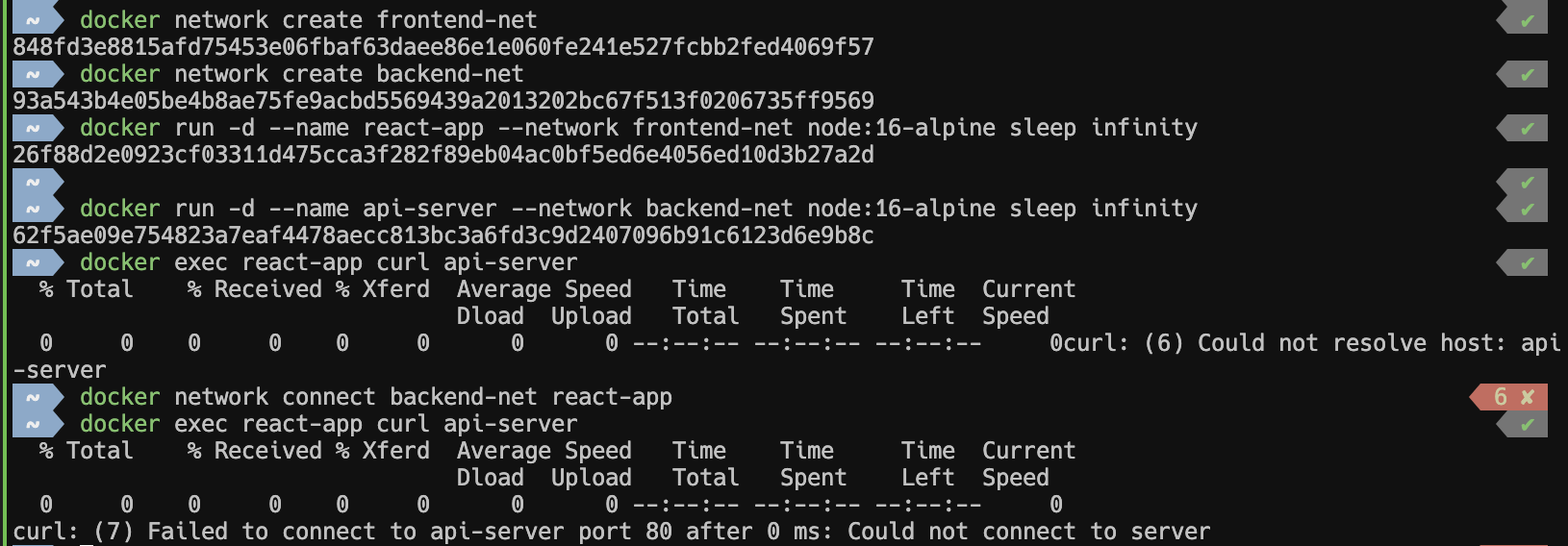
As we can see, containers on same network can now reach each other via the container name!
Default Bridge vs User-Defined Bridge#
| Feature | Default Bridge | User Defined Bridge |
|---|---|---|
| DNS Resolution | IP only | Container names |
| Network Isolation | All containers can reach each other | Only containers on same network |
| Runtime Network Changes | Limited | Connect/disconnect freely |
| Configuration Options | Fixed | Customizable (MTU, subnets, etc.) |
Scaling & Practical Considerations#
Local Development with Docker Compose#
For local development, Docker Compose automatically creates user-defined networks:
 1version: '3.8'
 2services:
 3  web:
 4    build: ./frontend
 5    ports: ["3000:3000"]
 6
 7  api:
 8    build: ./backend
 9    ports: ["8000:8000"]
10
11  db:
12    image: postgres:13
13    environment:
14      POSTGRES_PASSWORD: secret
All services can reach each other by service name (web, api, db) without any additional configuration.
Moving to Production#
Bridge networks work great for single-host development, but production often requires different approaches:
- Docker Swarm: Uses overlay networks for multi-host communication
- Kubernetes: Has its own CNI (Container Network Interface) implementation
- Cloud platforms: Often provide managed networking solutions
Summary#
- Default bridge network is fine for simple experiments, but lacks DNS resolution between containers and offers no isolation.
- User-defined bridge networks provide automatic DNS resolution and better security through network segmentation.
- Docker Compose automatically creates user-defined networks, making multi-container applications much easier to manage.
- Network isolation is a feature, not a bug and use multiple networks to create security boundaries between application tiers.